'>
<rect width='100' height='100' fill='%23B22234'/>
<!-- stripes -->
<g fill='%23fff'>
<rect y='10' width='100' height='10'/>
<rect y='30' width='100' height='10'/>
<rect y='50' width='100' height='10'/>
<rect y='70' width='100' height='10'/>
<rect y='90' width='100' height='10'/>
</g>
<!-- blue box -->
<rect width='50' height='50' fill='%233C3B6E'/>
</g>
</svg>)
'>
<rect width='100' height='100' fill='%23fff'/>
<rect width='100' height='33.33' y='0' fill='%23FF9933'/>
<rect width='100' height='33.33' y='66.66' fill='%23138808'/>
<!-- Ashoka Chakra -->
<circle cx='50' cy='50' r='9' fill='none' stroke='%23000080' stroke-width='2'/>
<g stroke='%23000080' stroke-width='1'>
<line x1='50' y1='41' x2='50' y2='59'/>
<line x1='41' y1='50' x2='59' y2='50'/>
<line x1='44' y1='44' x2='56' y2='56'/>
<line x1='56' y1='44' x2='44' y2='56'/>
</g>
</g>
</svg>)
 info@blackmarlintechnologies.com

Imagine checking your website analytics one morning and discovering that your organic traffic has dropped by 50% overnight.
At first, you assume it’s a reporting error.
But, after digging a little deeper, you start seeing your rankings for key terms dropping , strange backlinks turning up, and even pages you never made are showing up in Google index.
 The worst part?
You haven’t changed your website, published low-quality content, or violated Google’s guidelines.
So, what happened?
You may be dealing with a negative SEO attack.
Negative SEO is basically about using tactics to reduce a competitor’s search presence rather than making your own pages rise. Google is a lot better now at disregarding spam my backlinks and forced signals, but negative SEO keeps changing, it went past just link spam.
In 2026 attackers will use more sophisticated methods, like website hacking, content scraping, fake reviews, malicious redirects, bot traffic attacks, and even false copyright complaints, and yes that can really mess things up. These threats can harm your rankings, public image, user experience, and revenue, if you leave them unchecked.
- What Is Negative SEO?
- How Negative SEO Works?
- Is Negative SEO Still a Real Threat in 2026?
- Why Website Owners Should Still Be Concerned?
- 9 Types of Negative SEO Attacks You Should Watch for in 2026
- 1. Spam Backlink Attacks
- 2. Exact Match Anchor Text Manipulation
- 3. Website Hacking
- 4. Content Scraping
- 5. Fake Reviews
- 6. DDoS and Bot Traffic Attacks
- 7. Fake DMCA Complaints
- 8. Link Removal Requests
- 9. Negative PR Campaigns
- How to Detect Negative SEO Early?
- 1. Monitor Organic Traffic
- 2. Track Referring Domains
- 3. Check Index Coverage Reports
- 4. Monitor Crawl Errors
- 5. Review Anchor Text Distribution
- 6. Monitor Brand Reviews and Reputation
- Negative SEO Monitoring Dashboard
- 1. Organic Traffic
- 2. Keyword Rankings
- 3. Referring Domains
- 4. Spam Anchors
- 5. Indexed Pages
- 6. Crawl Errors
- How to Protect Your Website from Negative SEO?
- 1. Enable HTTPS
- 2. Enable Multi-Factor Authentication (MFA)
- 3. Create Daily Backups
- 4. Use Security Plugins and Monitoring Tools
- Recovery Plan: What to Do in the First 72 Hours After a Negative SEO Attack?
- Hour 1–24: Identify the Attack Source
- Hour 24–48: Contain the Damage
- Hour 48–72: Implement Fixes and Begin Recovery
- Recovery Timeline: How Long Does It Take?
- What Is the R.A.D.A.R Framework?
- Tools That Help Detect Negative SEO
- FAQ
What Is Negative SEO?
Negative SEO is the practice of using harmful tactics to reduce a competitor’s visibility in search engine results.
Instead of improving their own website, an attacker tries to damage another site’s rankings, traffic, or online reputation.
Think of it like a race. Most businesses work hard to run faster, by making their content more compelling, securing quality backlinks, and smoothing out the user experience. Negative SEO is what happens when someone tries to trip up another runner, instead of improving their own performance.
Even though Google has grown noticeably better at catching and then disregarding spam, a few negative SEO tactics can still cause headaches if they stay unnoticed. In the most serious situation, they may trigger traffic drop offs , security issues, harm to brand reputation, and less confidence from customers.
The goal of a negative SEO attack is simple: make a website appear less trustworthy to search engines and users.
Quick Example
Imagine two businesses competing for the same keyword.
Competitor A
- Publishes helpful content
- Earns genuine backlinks
- Improves website performance
- Focuses on helping users
Competitor B
- Creates thousands of spam backlinks pointing to Competitor A’s website
- Copies Competitor A’s content and republishes it elsewhere
- Posts fake negative reviews online
- Attempts to hack the website or inject malicious pages
Instead of improving their own SEO, Competitor B is trying to harm someone else’s rankings. This is a classic example of negative SEO.
How Negative SEO Works?
Search engines run on hundreds of clues to figure out which pages deserve top ranking. Negative SEO attempts mess with those clues, like by manufacturing fake warning signs around a website.
For example, an attacker may try to:
- Flood a website with low-quality backlinks
- Copy and distribute content across multiple websites
- Generate fake reviews to damage brand reputation
- Send automated bot traffic to distort analytics data
- Hack the website and create spam pages
- Remove valuable backlinks through impersonation
These activities can make it harder for website owners to understand what is happening and respond quickly.
Is Negative SEO Always Successful?
Not necessarily.
Google’s algorithms are way more advanced than they were ten years ago, and they can ignore a lot of those low-quality backlinks, pretty much on their own. Still, modern negative SEO campaigns don’t always stick to just links, they often go after other angles like site safety, brand reputation and overall user trust.
This is why checking your website regularly is so important , the earlier you spot any suspicious activity the easier it is to stop the long term harm from growing.
Is Negative SEO Still a Real Threat in 2026?
If you had asked this question 10 years ago, the answer would have been a clear yes.
Back then, negative SEO attacks usually did the whole thing with creating thousands of spam backlinks pointed at a competitor website, just to try to trip a Google penalty. These tactics were often more effective because search engines had a harder time separating the real links from the kind that were plainly manipulative.
Today, things are different.
Google algorithms seem a lot better now at spotting and simply ignoring low quality backlinks. In most situations, even just a spam link attack by itself probably won’t do much, like, real ranking damage.
However, this does not mean negative SEO has disappeared.
Instead, attackers have adapted a bit. Modern negative SEO kind of zeroes in on parts of things that can still mess with search visibility, user confidence, and website performance. They don’t always bank on spam links alone, these days. Often, the push goes toward website security, brand reputation, who really owns the content, and the overall user experience.
In other words, negative SEO is no longer just an SEO problem it is also a security and reputation management problem.
Why Website Owners Should Still Be Concerned?
Even if Google ignores many harmful backlinks, other attack methods can still cause serious consequences.
For example:
- A hacked website can expose visitors to malware and lead to deindexing.
- Fake reviews can reduce trust and lower conversion rates.
- Content scraping can create duplicate content issues.
- Bot traffic can distort analytics data and hide real performance trends.
- Malware injections can damage rankings and trigger browser security warnings.
These attacks may not always result in an immediate ranking drop, but they can affect the signals that influence long-term SEO success.
Modern Negative SEO Threat Levels
The table below shows how different attack types compare in terms of risk for websites in 2026.
| Attack Type | Risk Level | Why It Matters |
| Spam Backlinks | Low-Medium | Google often ignores many spam links automatically. |
| Website Hacking | Very High | Can cause ranking loss, security warnings, and loss of user trust. |
| Content Scraping | High | May create duplicate content and weaken content ownership signals. |
| Fake Reviews | High | Damages reputation, click-through rates, and conversions. |
| Bot Traffic Attacks | Medium-High | Distorts analytics and can impact website performance. |
| Malware Injection | Very High | Can lead to deindexing, security alerts, and major traffic loss. |
9 Types of Negative SEO Attacks You Should Watch for in 2026
Not all negative SEO attacks look the same.
Some attackers try to meddle with search signals straightaway, and others go after reputation, security, or the entire user experience, like they want to ruin it from the inside. If you understand these tactics , it becomes a bit easier to spot warning signs early before they turn into serious damage.
Let’s look at the most common negative SEO attacks website owners face today.
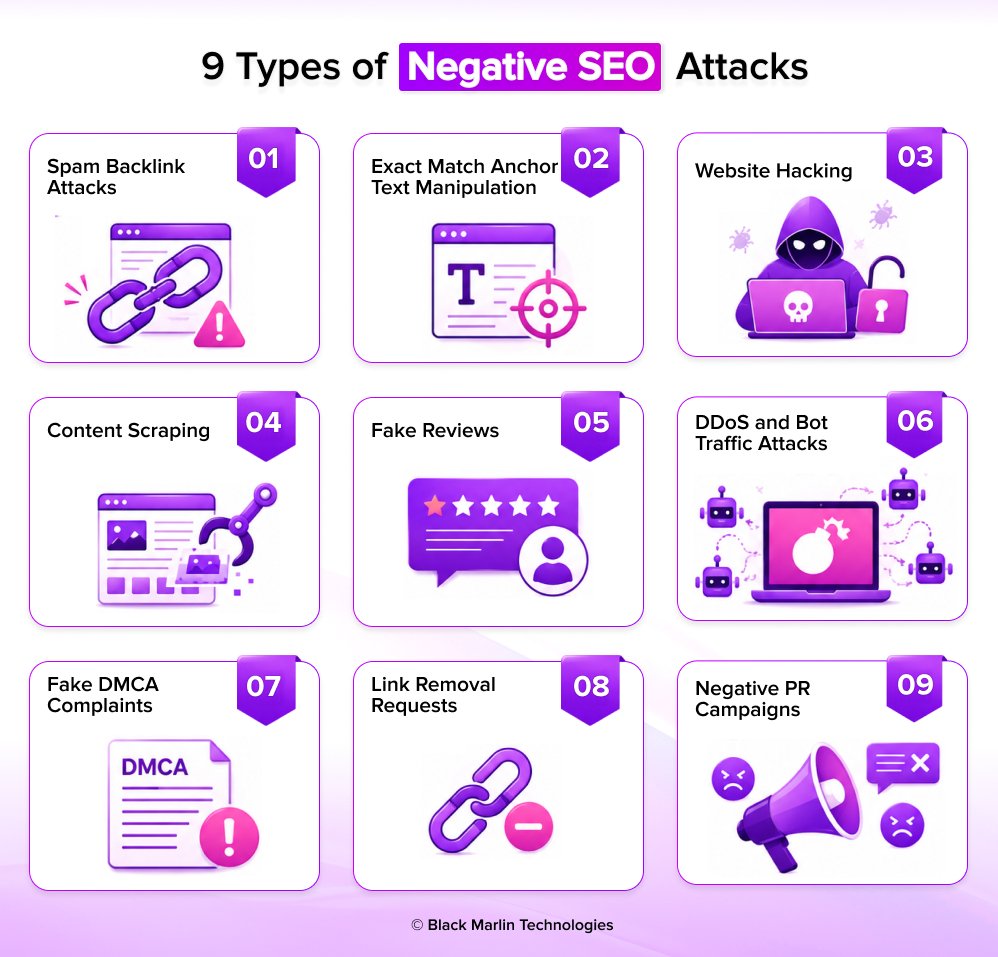
1. Spam Backlink Attacks
A spam backlink attack occurs when someone creates thousands of low-quality or irrelevant links pointing to your website.
These links often come from:
- Spam blogs
- Link farms
- Adult websites
- Gambling websites
- Foreign-language directories
- Automatically generated pages
The goal is to make your backlink profile appear unnatural.
Although Google can ignore many of these links, a sudden flood of spam backlinks should still be investigated.
2. Exact Match Anchor Text Manipulation
Anchor text is the clickable text used in a backlink.
Attackers may create links using spammy anchor text to make your website appear associated with harmful or irrelevant topics.
3. Website Hacking
Website hacking is one of the most damaging forms of negative SEO.
Instead of attacking from the outside, hackers gain access to your website and make unauthorized changes.
These changes may be invisible to visitors while still affecting search engines.
4. Content Scraping
Content scraping occurs when bots copy your articles and publish them on other websites without permission.
This is especially common for high-performing content that ranks well in search results./p>
5. Fake Reviews
Online reviews influence both search rankings and customer trust.
Some attackers attempt to damage a business by posting fake negative reviews across review platforms.
Common Targets
- Google Business Profile
- Trustpilot
- Yelp
- Industry-specific review websites
Impact on SEO
Fake reviews can cause:
- Lower click-through rates (CTR)
- Reduced customer trust
- Fewer conversions
- Reputation damage
6. DDoS and Bot Traffic Attacks
Bot traffic attacks use automated programs to flood a website with fake visitors.
Some attacks focus on overwhelming servers, while others attempt to distort analytics data.
7. Fake DMCA Complaints
A DMCA complaint is normally used to protect copyrighted content.
However, attackers sometimes misuse this process by filing false copyright claims against legitimate websites.
8. Link Removal Requests
In this attack, someone pretends to represent your company and contacts websites linking to you.
Their goal is to convince website owners to remove valuable backlinks.
9. Negative PR Campaigns
Negative PR attacks focus on damaging your brand reputation rather than directly targeting SEO signals.
These attacks often spread across multiple platforms at the same time.
Common Tactics
- Social media attacks
- Fake forum discussions
- False accusations
- Review bombing campaigns
- Coordinated reputation attacks
How to Detect Negative SEO Early?
The biggest mistake website owners make is waiting until rankings drop before investigating a problem.
By the time you notice a significant traffic decline, the attack may have been affecting your website for weeks or even months.
The good news is that most negative SEO attacks leave behind warning signs long before they cause serious damage.
That’s why early detection is your best defense.
Instead of checking your website only when something goes wrong, try a simple weekly monitoring routine. Think of it like a health checkup for your site, sort of, a regular scan. The sooner you notice odd behavior or strange traffic, the faster you can respond and reduce the overall impact.
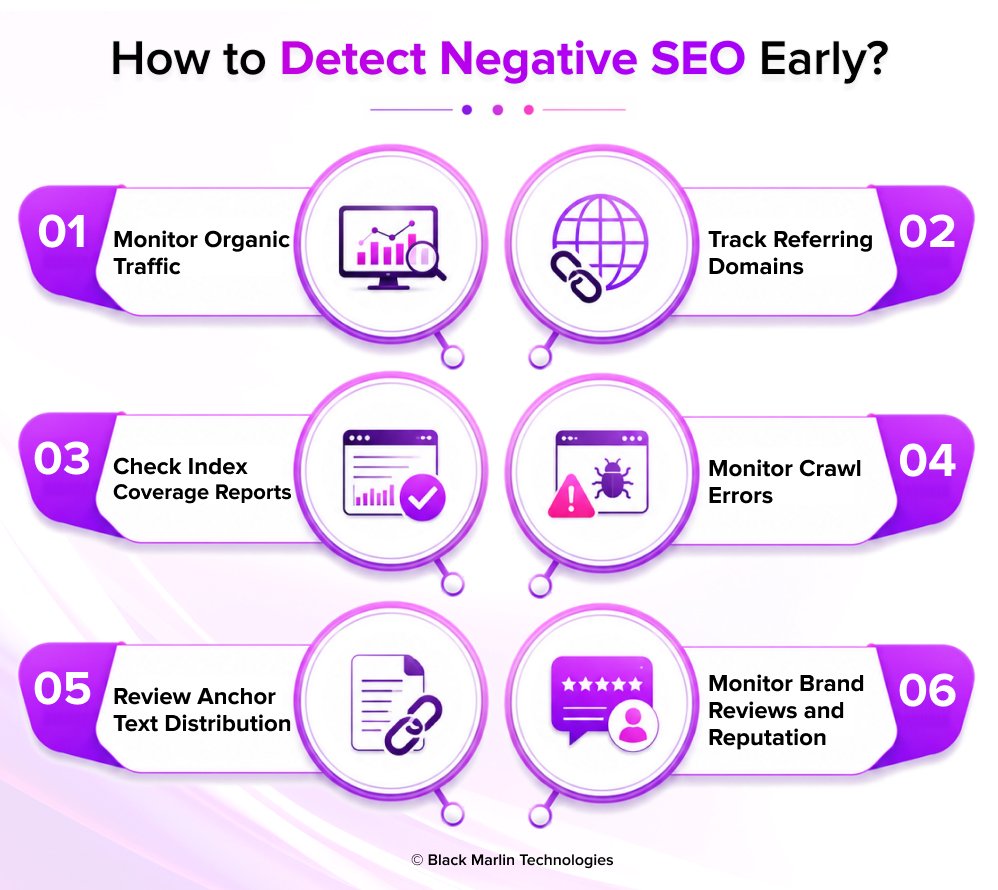
1. Monitor Organic Traffic
Organic traffic is often the first place where problems become visible.
If rankings are affected, traffic usually follows.
- Traffic drops of 20% or more
- Sudden declines across multiple pages
- Loss of traffic without a known Google update
- Significant decreases in branded search traffic
Your website normally receives 5,000 organic visits per week. If traffic suddenly drops to 3,800 visits without any major site changes, it’s worth investigating further.
2. Track Referring Domains
A sudden increase in backlinks can be a warning sign of a spam link attack.
While earning backlinks naturally is positive, unusually fast growth from low-quality websites should be reviewed.
- Large backlink spikes
- Links from unrelated industries
- Foreign-language domains
- Adult, casino, or gambling websites
More than 30% growth in referring domains within a short period.
If your website typically gains 10 referring domains per month and suddenly gains 500 in a week, investigate the source of those links.
3. Check Index Coverage Reports
Your indexed pages should grow gradually as you publish new content.
Unexpected spikes may indicate security issues or unauthorized pages.
- Hundreds of new indexed URLs
- Unknown pages appearing in search results
- Spam pages being indexed
- Duplicate content pages
A website with 200 pages suddenly shows 1,500 indexed URLs in Search Console. This may indicate a hacking or content injection attack.
4. Monitor Crawl Errors
Search engines rely on crawling your website to understand and rank content.
A sudden increase in crawl errors may signal technical issues or malicious activity.
Common Errors
- 404 errors
- Redirect loops
- Server errors
- Blocked resources
An increase of 20% or more in crawl-related issues.
If crawl errors jump from 10 to 100 within a few days, something unusual may be affecting your website.
5. Review Anchor Text Distribution
Anchor text patterns can reveal backlink manipulation.
A healthy backlink profile usually contains:
- Brand names
- Website URLs
- Natural phrases
- Generic anchors
Spam attacks often introduce suspicious anchor text.
Warning Signs
- Adult-related terms
- Gambling keywords
- Pharmaceutical keywords
- Foreign-language anchors
If spam anchors exceed 5% of your total anchor profile, perform a backlink audit.
Spam Anchor % = (Spam Anchors ÷ Total Anchors) × 100
If 50 out of 1,000 anchors are spam-related:
50 ÷ 1,000 × 100 = 5%
This is a signal worth reviewing.
6. Monitor Brand Reviews and Reputation
Negative SEO doesn’t always target rankings directly.
Sometimes attackers try to damage customer trust through fake reviews.
- Multiple negative reviews appearing within days
- Reviews from accounts with little activity
- Reviews mentioning events that never occurred
- Coordinated review patterns
A sudden spike in negative reviews compared to your normal review volume.
A local business usually receives two reviews per week. Suddenly, twenty one-star reviews appear within 48 hours.
This may indicate review manipulation rather than genuine customer feedback.
Negative SEO Monitoring Dashboard
You can’t protect your website from negative SEO if you’re only checking performance when rankings drop.
The most successful website owners don’t wait for problems to appear they monitor key SEO metrics every week and look for unusual patterns before they become serious issues.
This is where a negative SEO monitoring dashboard becomes valuable.
Think of it as your website’s security control center. Instead of opening multiple tools every day, you can track the most important SEO health indicators in one place and quickly identify warning signs.
Why You Need a Monitoring Dashboard?
Most negative SEO attacks don’t happen overnight.
Whether it’s a spam backlink attack, content scraping campaign, fake review bombing, or website hacking attempt, there are usually early warning signals.
A monitoring dashboard helps you:
- Detect attacks before rankings are affected
- Identify unusual traffic patterns
- Monitor backlink quality
- Track indexing issues
- Spot suspicious crawl activity
- Respond faster to threats
The goal isn’t to watch every metric every day. It’s to monitor the few signals that reveal when something unusual is happening.
Key Metrics to Track
Your dashboard should focus on six critical metrics.
| Metric | Why It Matters | Warning Sign |
| Organic Traffic | Shows visibility in search results | Sudden drop of 20% or more |
| Keywords | Measures ranking performance | Large keyword losses |
| Referring Domains | Detects backlink attacks | Unexpected growth spike |
| Spam Anchors | Identifies anchor text manipulation | More than 5% spam anchors |
| Indexed Pages | Detects hacking or content injection | Sudden page increases |
| Crawl Errors | Reveals technical issues | Significant error growth |
Monitoring these metrics weekly can help uncover most forms of negative SEO before they cause major damage.
1. Organic Traffic
Organic traffic is often the first indicator that something is wrong.
If search visibility decreases, traffic usually follows.
- Weekly traffic changes
- Month-over-month growth
- Landing page performance
- Branded vs non-branded traffic
Warning Signal
A sudden traffic decline of 20% or more without a known Google update or website change.
2. Keyword Rankings
Keyword rankings help you understand whether your visibility is improving, stable, or declining.
Negative SEO attacks often impact rankings before they affect overall traffic.
- Total ranking keywords
- Top 3 keyword positions
- Top 10 keyword positions
- Largest ranking drops
Warning Signal
Multiple important keywords losing positions at the same time.
3. Referring Domains
Referring domains represent the websites linking to your content.
Sudden backlink growth isn’t always a good thing.
- New referring domains
- Lost referring domains
- Link quality
- Domain relevance
Warning Signal
A 30% or greater increase in referring domains within a short period.
4. Spam Anchors
Anchor text tells search engines what linked content is about.
Attackers often use spam-related anchor text to manipulate backlink signals.
- Branded anchors
- Exact-match anchors
- Suspicious anchors
- Foreign-language anchors
Warning Signal
Spam anchors exceeding 5% of your total anchor profile.
5. Indexed Pages
The number of indexed pages on your website should grow gradually over time.
Unexpected increases may indicate content injection, hacking, or duplicate content issues.
- Total indexed pages
- Newly indexed URLs
- Excluded pages
- Discovered but not indexed pages
Warning Signal
A large increase in indexed pages without publishing new content.
6. Crawl Errors
Search engines must successfully crawl your website to understand and rank it.
A rise in crawl errors can indicate technical issues or malicious interference.
- 404 errors
- Server errors
- Redirect chains
- Blocked resources
Warning Signal
A significant increase in crawl-related errors compared to normal levels.
How to Protect Your Website from Negative SEO?
The best way to recover from a negative SEO attack is to prevent it from happening in the first place.
Even though no website is ever truly immune to attacks , having a solid defense strategy can greatly lower your exposure and it also helps you spot issues earlier , before they start messing with rankings, visit flow, or even revenue.
Think of website protection like home security.
You lock your doors, put up security cameras and keep an eye on your property, not because you think there’s gonna be an attack every day, but because planning ahead makes it a lot harder for intruders to go through and succeed.
The same principle applies to SEO.
A complete protection strategy should focus on two areas:
- Technical Protection – Securing your website and infrastructure.
- SEO Protection – Monitoring the signals that influence search performance.
Let’s look at both.
Technical Protection
Many modern negative SEO attacks target website security rather than rankings directly.
Hackers often look for weaknesses that allow them to inject spam pages, install malware, create redirects, or gain unauthorized access.
Strengthening your website’s security reduces the likelihood of these attacks succeeding.
1. Enable HTTPS
HTTPS encrypts the connection between your website and visitors.
Without HTTPS, attackers may be able to intercept sensitive information or exploit insecure connections.
Why It Matters
- Protects user data
- Improves website trust
- Helps secure login sessions
- Supports SEO best practices
Quick Check
Look at your browser’s address bar.
If your website begins with https://, you’re using a secure connection.
Best Practice
Install and maintain a valid SSL certificate and ensure all pages redirect to HTTPS versions.
2. Enable Multi-Factor Authentication (MFA)
Passwords alone are no longer enough.
Even strong passwords can be stolen through phishing attacks, data breaches, or malware.
Multi-Factor Authentication (MFA) adds an extra layer of protection by requiring a second verification step.
Why It Matters
Even if an attacker discovers your password, they cannot access your account without the additional verification method.
Protect These Accounts
- CMS administrator accounts
- Hosting accounts
- Domain registrar accounts
- Google Search Console accounts
- Analytics accounts
Example
Instead of logging in with only a password, you also confirm a code sent to your phone or authentication app.
3. Create Daily Backups
Backups are your safety net.
If a website becomes hacked, infected with malware, or accidentally damaged, backups allow you to restore a clean version quickly.
Why It Matters
Backups can significantly reduce recovery time after an attack.
Best Practices
- Schedule automatic daily backups
- Store backups in multiple locations
- Test backup restoration regularly
- Keep several backup versions available
Example
If malware infects your website today, a clean backup from yesterday could restore normal operations within minutes.
4. Use Security Plugins and Monitoring Tools
Security plugins help identify suspicious activity before it becomes a serious issue.
They can monitor file changes, login attempts, malware signatures, and unauthorized access attempts.
What Security Tools Can Detect
- Malware injections
- Unauthorized logins
- File modifications
- Brute-force attacks
- Suspicious IP activity
Recovery Plan: What to Do in the First 72 Hours After a Negative SEO Attack?
Discovering a negative SEO attack can be stressful.
Whether you’ve noticed a sudden traffic drop, thousands of spam backlinks, fake reviews, or signs of website hacking, your first reaction may be to fix everything immediately.
However, rushing into changes without understanding the problem can sometimes make recovery harder.
The best approach is to follow a structured recovery plan.
Think of it like responding to a medical emergency. First, you identify the cause. Then, you stop the damage from spreading. Finally, you begin the recovery process.
The first 72 hours are critical because the actions you take during this period can significantly affect how quickly your website recovers.
Hour 1–24: Identify the Attack Source
Before fixing anything, you need to understand exactly what happened.
Many website owners assume every ranking drop is caused by negative SEO when the real cause may be a technical issue, content update, or Google algorithm change.
Your goal during the first 24 hours is to gather evidence.
What to Check
Search Console
Look for:
- Security issues
- Manual actions
- Indexing anomalies
- Coverage errors
Analytics Data
Review:
- Traffic changes
- Landing page performance
- Geographic traffic sources
- Bounce rate increases
Backlink Profile
Investigate:
- New backlinks
- Toxic domains
- Spam anchor text
- Link velocity changes
Website Security
Scan for:
- Malware
- Hidden pages
- Unauthorized redirects
- Suspicious user accounts
Goal of Hour 1–24
Identify:
- Attack type
- Affected pages
- Severity level
- Potential source
Do not start deleting large numbers of links or making major changes until you understand the root cause.
Hour 24–48: Contain the Damage
Once you’ve identified the problem, the next step is to stop it from getting worse.
The actions you take here will depend on the type of attack.
If You’re Facing a Spam Link Attack
- Document suspicious backlinks
- Monitor anchor text changes
- Contact webmasters if necessary
- Prepare a disavow file if required
If Your Website Was Hacked
- Remove malicious files
- Change all passwords
- Revoke unauthorized access
- Restore clean backups if needed
- Update plugins and software
If You’re Experiencing Fake Reviews
- Report fraudulent reviews
- Document review activity
- Respond professionally where appropriate
- Monitor review platforms daily
If Content Has Been Scraped
- Identify copied content
- Contact website owners
- File removal requests where necessary
- Strengthen canonical implementation
If Bot Traffic Is the Problem
- Block suspicious IP addresses
- Enable bot protection
- Review server logs
- Activate CDN security features
Goal of Hour 24–48
Contain the issue before additional damage occurs.
Focus on:
- Stopping malicious activity
- Securing vulnerable systems
- Preserving evidence
- Preventing further ranking loss
At this stage, stabilization is more important than recovery.
Hour 48–72: Implement Fixes and Begin Recovery
Once the threat is under control, you can begin the recovery process.
This stage focuses on helping search engines and users trust your website again.
Submit Fixes to Search Engines
Depending on the issue, you may need to:
- Request reindexing
- Submit updated sitemaps
- Resolve indexing issues
- Submit reconsideration requests
- Remove hacked content
Rebuild Trust Signals
Focus on:
- Publishing quality content
- Improving website security
- Monitoring backlinks
- Restoring user trust
- Fixing technical issues
Increase Monitoring
During recovery, review key metrics daily:
- Organic traffic
- Keyword rankings
- Indexed pages
- Referring domains
- Crawl errors
- Brand reviews
Document Everything
Keep records of:
- Attack timeline
- Fixes implemented
- Removed content
- Security updates
- Recovery progress
This documentation can help if future investigations become necessary.
Goal of Hour 48–72
Begin long-term recovery while ensuring the attack has been fully addressed.
Focus on:
- Search engine communication
- Technical cleanup
- Reputation repair
- Ongoing monitoring
Recovery Timeline: How Long Does It Take?
One of the most common questions website owners ask is:
“How quickly will my rankings return?”
The answer depends on the attack type, severity, and how quickly it was detected.
| Attack Type | Estimated Recovery Time |
| Spam Link Attack | 2–8 Weeks |
| Website Hacking | 1–12 Weeks |
| Manual Action | 1–3 Months |
| Fake Review Campaign | Ongoing Monitoring Required |
Negative SEO Prevention Framework: The R.A.D.A.R Method
Most website owners think about negative SEO only after something goes wrong.
Unfortunately, by the time rankings drop, traffic disappears, or spam pages start appearing in Google, the damage may already be done.
That’s why prevention is always better than recovery.
To make negative SEO protection simple and easy to remember, use the R.A.D.A.R Framework.
Just like a radar system helps pilots detect threats before they become dangerous, this framework helps website owners identify risks early and take action before they affect rankings.
The goal is simple:
Spot problems early. Respond before they become serious.
What Is the R.A.D.A.R Framework?
R.A.D.A.R is a five-step prevention system designed to help website owners monitor, protect, and maintain their SEO health.
R = Review Backlinks Weekly
A = Audit Website Security Monthly
D = Detect Traffic Anomalies
A = Analyze Rankings
R = Respond Quickly
When followed consistently, these five habits can help identify most negative SEO threats before they cause significant damage.
R = Review Backlinks Weekly
Backlinks remain one of the most common targets of negative SEO attacks.
Although Google has become better at ignoring spammy links, a sudden influx of low-quality backlinks can still create confusion and signal potential problems.
That’s why reviewing your backlink profile every week is essential.
What to Check
- New backlinks
- Lost backlinks
- Referring domains
- Anchor text distribution
- Toxic link scores
Warning Signs
- Hundreds of new backlinks appearing suddenly
- Adult, casino, or gambling websites linking to you
- Foreign-language websites unrelated to your business
- Large increases in spam anchor text
Recommended Frequency
Every Week
Even a 10-minute backlink review can help you identify suspicious activity before it escalates.
A = Audit Website Security Monthly
Modern negative SEO often targets website security rather than backlinks.
A single security breach can result in:
- Malware injections
- Hidden spam pages
- Unauthorized redirects
- Data theft
- Search visibility loss
Regular security audits help identify vulnerabilities before attackers find them.
What to Check
- Plugin updates
- CMS updates
- User accounts
- Malware scans
- Login activity
- Backup integrity
Warning Signs
- Unknown administrator accounts
- Unexpected file changes
- Malware alerts
- Security notifications from hosting providers
Recommended Frequency
Once Per Month
For larger websites, consider performing security reviews more frequently.
D = Detect Traffic Anomalies
Traffic patterns often reveal problems before rankings change.
Many negative SEO attacks leave unusual footprints in analytics data.
The key is knowing what “normal” looks like for your website.
What to Monitor
- Organic traffic
- Direct traffic
- Referral traffic
- Bounce rate
- Session duration
- Geographic traffic sources
Warning Signs
- Organic traffic drops of 20% or more
- Sudden spikes in direct traffic
- Traffic from unexpected countries
- Bounce rates exceeding normal levels
Tools That Help Detect Negative SEO
You don’t need dozens of expensive SEO tools to detect negative SEO attacks.
In fact, a small toolkit can help you monitor most warning signs, including spam backlinks, indexing issues, suspicious traffic patterns, website security problems, and technical errors.
The key is knowing which tool to use and what signals to watch.
Think of these tools as your website’s early warning system. Together, they help you identify problems before they affect rankings, traffic, or revenue.
Negative SEO Detection Toolkit
| Tool | Primary Purpose | What It Helps Detect |
| Google Search Console | Search Performance & Indexing | Hacking, indexing issues, manual actions |
| Google Analytics 4 | Traffic Monitoring | Traffic anomalies, bot attacks |
| Ahrefs | Backlink Analysis | Spam backlinks, toxic anchors |
| Semrush | Link Auditing | Toxic links, backlink attacks |
| Screaming Frog | Technical SEO Audits | Hidden pages, redirects, crawl issues |
| Cloudflare | Security & Traffic Protection | Bot traffic, DDoS attacks, suspicious requests |
FAQ
Q1. Can Negative SEO Still Hurt Rankings?
Ans1. – Yes. While Google ignores many spam links, attacks involving hacking, malware, content theft, and reputation damage can still impact rankings and traffic.
Q2. Should I Disavow Spam Backlinks?
Ans2. – Disavow spam backlinks only when there is clear evidence that harmful or manipulative links are affecting your website.
Q3. How Long Does Recovery Take?
Ans3. – Recovery can take anywhere from a few weeks to several months depending on the type and severity of the attack.
Q4. Does Google Protect Websites from Negative SEO?
Ans4. – Google automatically filters many spam signals, but website owners must still monitor, secure, and maintain their websites.
Q5. What Are the First Signs of a Negative SEO Attack?
Ans5. – Sudden changes in rankings, traffic, backlinks, indexing, or reviews are often early warning signs of negative SEO.
Q6. What Is the Most Dangerous Type of Negative SEO Today?
Ans6. – Website hacking and malware attacks are typically the highest-risk forms of negative SEO today.
Q7. Can Fake Reviews Affect SEO?
Ans7. – Yes. Fake reviews can damage trust, reduce conversions, and negatively affect local search visibility.
Q8. How Often Should I Monitor My Website for Negative SEO?
Ans8. – Review key SEO and security metrics at least once per week to identify potential issues early.
Q9. Do Small Websites Need to Worry About Negative SEO?
Ans9. – Yes. Negative SEO can affect websites of all sizes, making monitoring and protection important for every business.