'>
<rect width='100' height='100' fill='%23B22234'/>
<!-- stripes -->
<g fill='%23fff'>
<rect y='10' width='100' height='10'/>
<rect y='30' width='100' height='10'/>
<rect y='50' width='100' height='10'/>
<rect y='70' width='100' height='10'/>
<rect y='90' width='100' height='10'/>
</g>
<!-- blue box -->
<rect width='50' height='50' fill='%233C3B6E'/>
</g>
</svg>)
'>
<rect width='100' height='100' fill='%23fff'/>
<rect width='100' height='33.33' y='0' fill='%23FF9933'/>
<rect width='100' height='33.33' y='66.66' fill='%23138808'/>
<!-- Ashoka Chakra -->
<circle cx='50' cy='50' r='9' fill='none' stroke='%23000080' stroke-width='2'/>
<g stroke='%23000080' stroke-width='1'>
<line x1='50' y1='41' x2='50' y2='59'/>
<line x1='41' y1='50' x2='59' y2='50'/>
<line x1='44' y1='44' x2='56' y2='56'/>
<line x1='56' y1='44' x2='44' y2='56'/>
</g>
</g>
</svg>)
 info@blackmarlintechnologies.com

Have you ever clicked on a website that just, took forever to load? Most people don’t actually wait. They usually close the page, then go check another site. In today’s fast-moving digital world visitors expect pages to load quickly, to react instantly, and to stay steady while browsing. That’s kind of why Core Web Vitals for SEO has turned into an important part of making a successful website.
 Google rolled out Core Web Vitals alongside its Page Experience update, more or less to push sites toward a quicker, smoother, more comfortable experience. Rather than staring just at keywords, backlinks, or that type of thing, Google also checks what real visitors run into. Like if your pages take too long to appear, if taps and buttons answer late, or if the content unexpectedly shifts while someone is still reading, people might bounce, and basically leave before doing any real action.
Improving Core Web Vitals for SEO actually helps, create a better kind of experience for your audience. When a website loads faster, people stay around longer, less bouncing happens, trust tends to grow, and conversions often rise too. Core Web Vitals are just one piece of the puzzle among Google’s ranking signals, but they still bolster your wider SEO plan by making your site more accessible and smoother to use.
- 53% of mobile users leave a website that takes longer than 3 seconds to load.
- Google measures Core Web Vitals using real-user data collected through the Chrome UX Report (CrUX), providing insights based on actual visitor experiences rather than only lab tests.
- Interaction to Next Paint (INP) officially replaced First Input Delay (FID) as a Core Web Vital in March 2024, making responsiveness measurement more accurate.
- What Are Core Web Vitals?
- Why Google Introduced Core Web Vitals?
- Why Core Web Vitals Matter for SEO?
- Core Web Vitals vs PageSpeed Insights vs Lighthouse
- How Google Measures Core Web Vitals?
- 1. Chrome UX Report (CrUX)
- 2. Google Search Console
- 3. PageSpeed Insights
- 4. Lighthouse
- 5. Chrome DevTools
- 25 Proven Ways to Improve Core Web Vitals
- Frequently Asked Questions (FAQs)
- Conclusion
What Are Core Web Vitals?
Core Web Vitals are three performance metrics, sort of a set that Google came up with, to gauge how people actually experience a site, in the real world. They pretty much look at how quickly a page loads, how promptly it reacts when someone clicks or taps, and how steady the content stays while the page is still doing its thing. These measures are tied closely to Google’s Page Experience signals, and they help site owners get a clearer picture of whether visitors are getting a blowy, enjoyable browsing experience.
Core Web Vitals, rather than just measuring technical performance, are there to pay attention to User Experience (UX) kind of overall. A site can look really good, you know visually, but if it loads slow, answers too late, or the page layout keeps doing that shifting thing then users tend to leave quickly, before they ever take any action. So Google uses these metrics to push websites to deliver a quicker, more dependable experience for every single visitor.
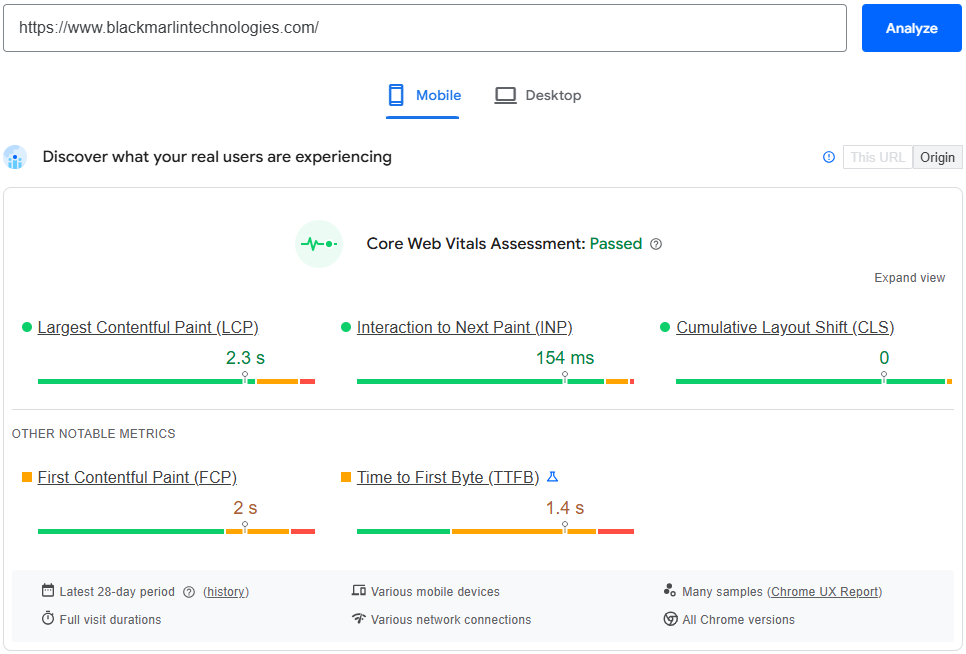
The three Core Web Vitals kind of measure different sides of website performance. Largest Contentful Paint (LCP) focuses on loading speed, it counts how fast the main content shows up on the screen. Interaction to Next Paint (INP) is about responsiveness, so it shows how quickly the page reacts once someone clicks taps, or types. Cumulative Layout Shift (CLS) deals with visual stability, it makes sure buttons, images, and text stay put, instead of shifting around a bit while the page is still loading.
Even though Core Web Vitals for SEO are only one part, among many Google ranking signals, they still matter a lot for page experience. Like, a site that loads fast, answers right away, and stays visually stable does a better job keeping people around, which lowers bounce rate, builds real confidence, and gives you more chances to earn higher positions plus stronger conversions.
Why Google Introduced Core Web Vitals?
Google brought in Core Web Vitals to push website owners to build something that feels quicker and more user friendly, sort of less laggy, right. Over time, the internet expanded fast, but a lot of sites also got more heavy with huge images, videos, animations, and those third party scripts. So pages tend to load slowly, they can react poorly, and then visitors get that overall irritating experience. To fix that whole mess Google made Core Web Vitals a major piece of its Page Experience signals, which guides businesses to improve real user experiences, not just chase search rankings.
- Poor Website Experience: One of Google’s biggest worries was the rising number of sites that kinda deliver a rough browsing experience. Slow-loading pages, laggy buttons , and content that seems to jump around while it’s still loading can really annoy people. If visitors have trouble finding their way, they tend to bounce fast, meaning they leave before reading much, before making a purchase, or even without filling out a contact form. Core Web Vitals help spot those snags, so site owners can sort them out and end up with a more steady and smoother experience.
- Mobile-First Browsing: Today, a lot of people are on the internet through smartphones instead of desktop computers, honestly. Mobile users usually deal with slower connections and also with tinier screens, so website performance gets more critical than ever. And because Google does mobile-first indexing, it basically looks at the mobile side of a website first, for rankings. Core Web Vitals push companies to improve their websites for these on-the-go visitors: think faster loading time, better responsiveness, and fewer visual hiccups across different devices.
- Encouraging Faster Websites: Website speed sort of affects user satisfaction right away. People who land on your site expect the web pages to load in just a few seconds and if they wait too long they often leave, kinda immediately. Core Web Vitals give more or less definite performance yardsticks so developers can spot sluggish pages, and then tune them using image optimization, browser caching, better hosting, content delivery networks (CDNs), and clean coding practices. In the end a swifter site improves the whole user experience and also tends to lift engagement plus conversions.
- Better Usability: A speedy website on its own isn’t enough it needs to feel easy to use too. People expect tap and click buttons to answer right away, forms to move along smoothly, and the page parts to stay put while everything is still loading. In practice, Core Web Vitals look at these kinds of usability factors, judging responsiveness as well as whether the visuals stay steady. When visitors can interact with the site without lag, or strange layout jumps, they tend to linger longer, browse more pages, and actually finish the key actions.
- Delivering a Better Search Experience: Google wants to give people the most helpful search results and, also a smoother browsing experience once they click in. So Core Web Vitals for SEO really ends up being about how things feel in real use, not just those technical scorecards. Any site that pairs genuinely useful content with fast loading, snappy interactions, and layouts that don’t jump around too much is more ready to meet what users expect. Core Web Vitals are only one ranking cue among many, but they still back up Google’s mission, which is to deliver dependable, high- quality search experiences for everyone.
Why Core Web Vitals Matter for SEO?
Core Web Vitals play a real important role in making a website feel fast, dependable, and more comfortable for users. They help Google get a clear picture of how actual visitors experience your pages, by watching loading speed, how responsive everything feels, and the visual stability while the page is doing its thing. When Core Web Vitals for SEO are handled well, they can support stronger search results, but it’s only one piece of a bigger, successful SEO plan. Google also weighs plenty of other things, like content that’s truly high quality, the search intent behind a query, relevance, links from other sites, and overall site authority.
Think of Core Web Vitals as like a practical approach to make your website feel smoother overall for people who come by. If visitors feel satisfied, that tends to happen more, they stick around longer, browse through extra pages, and then actually follow through with important steps like purchasing something or sending a contact request. Those good user signals, in turn can help your long run SEO results.
- Better Rankings: Google includes Core Web Vitals in its Page Experience signals, so if a site loads fast, answers smoothly, and stays consistent as people scroll around, then it tends to have a better shot at showing up against similar pages in search results. But still, even truly great Core Web Vitals by themselves, they don’t magically make a page rank if the material isn’t actually valuable or relevant. In the end, useful and high-quality content remains the main deciding factor.
- Better User Experience: Visitors expect expect websites to feel quick and keep going without interruptions. When pages are slow, when interactions are delayed, or when content starts shifting around, it creates a lot of irritation, and users usually just leave. By optimizing Core Web Vitals, your site becomes easier to navigate, so people can locate the right information faster and overall get a more fluid experience on every device.
- Lower Bounce Rate: When a website loads quickly and does its job well, visitors are more inclined to stay instead of slipping out right after seeing just one page. Faster loading times, and smoother interactions, really matter because they cut down on that little frustration factor. As a result, people keep browsing your website longer and end up digging into more content.
- Higher Engagement: A website that reacts immediately really motivates people to click, hover, and interact with your content. When someone is reading blog posts, watching videos, completing forms, or wandering through product pages, you tend to get a smoother browsing rhythm. And that kind of fluid experience often means visitors stay longer on your website, and then they are more likely to engage with your brand.
- Better Conversion Rate: Website performance sort of has a direct effect on conversions, like it’s not just a technical thing. When people can open the info fast, move through the site, and finish forms without waits or weird layout jumps, they tend to act. By improving Core Web Vitals, you reduce those small obstacles, that might stop someone from buying something, scheduling a service, or reaching out to your business.
- Increased Trust: A fast and reliable website creates a positive first impression. Visitors naturally trust websites that load quickly, work smoothly, and appear professional. In contrast, slow or unstable websites can make users question a business’s credibility. Strong Core Web Vitals help build confidence and encourage visitors to return in the future.
- Higher Customer Satisfaction: When users feel satisfied, they’re usually more inclined to come back to your website, refer your business to other people, and stick around as loyal customers. Also if you work on faster loading times, better responsiveness, and steadier visuals, you end up with a smooth browsing experience that aligns with what people expect, both on desktop and on mobile devices.
Core Web Vitals vs PageSpeed Insights vs Lighthouse
Many people think Core Web Vitals, PageSpeed Insights, and Lighthouse are the same, but they serve different purposes. While they all help measure website performance, they collect data in different ways and are used for different goals.
- Core Web Vitals measure the real experience of website visitors.
- PageSpeed Insights analyzes your page using both real-user data and lab data to identify performance issues.
- Lighthouse is a developer tool that runs performance tests in a controlled environment and helps debug technical problems before they affect users.
Understanding these differences helps you choose the right tool for measuring performance, troubleshooting issues, and improving your website for both users and search engines.
Core Web Vitals vs PageSpeed Insights vs Lighthouse
| Feature | Core Web Vitals | PageSpeed Insights | Lighthouse |
| Primary Purpose | Measure real user experience | Analyze website performance and provide optimization suggestions | Debug and audit website performance during development |
| Data Source | Real-user data (Chrome UX Report) | Real-user data + Lab data | Lab data only |
| Reflects Actual Users? | Yes | Yes (when field data is available) | No |
| Used for Debugging? | No | Yes | Yes |
| Shows Performance Opportunities | Limited | Yes | Yes |
| Measures Loading, Responsiveness & Stability | Yes | Yes | Yes |
| Provides SEO & Accessibility Audits | No | Limited | Yes |
| Best For | Monitoring real website performance | Finding performance issues and optimization opportunities | Developers testing changes before deployment |
How Google Measures Core Web Vitals?
Google doesn’t really depend on one lone tool to judge Core Web Vitals. They mix real user signals with lab testing tools, so it’s not just one measurement or single check. By doing it this way, Google can see how actual visitors experience your site, but also spot where developers can tune up performance.
For Core Web Vitals in terms of SEO, the most important information really comes from actual people using your site day to day. Google gathers these signals via the Chrome UX Report, or CrUX. At the same time, things like Google Search Console, PageSpeed Insights, Lighthouse, and Chrome DevTools support website owners in spotting weak spots and tightening them up before they start bothering visitors.
Let’s explore each tool and understand how it contributes to measuring Core Web Vitals.
1. Chrome UX Report (CrUX)
The Chrome User Experience Report (CrUX) is Googles official source of real user, field data, you know . It gathers anonymized performance info from millions of Chrome users who have agreed to share their usage statistics.
Unlike testing tools that simulate how a page behaves, CrUX measures how your site does for real people, across different gadgets, varying internet speed, and multiple areas. Google uses this information mainly to judge if your pages make it through or fail the Core Web Vitals evaluation.
What CrUX Measures?
- Largest Contentful Paint (LCP)
- Interaction to Next Paint (INP)
- Cumulative Layout Shift (CLS)
Best For
- Measuring real-world website performance
- Understanding actual visitor experience
- Monitoring Google’s Page Experience signals
Key Point: CrUX is the closest representation of how Google evaluates your website’s Core Web Vitals.
2. Google Search Console
Google Search Console provides a dedicated Core Web Vitals Report that helps website owners monitor performance across all indexed pages.
Instead of staring at one page at a time, Search Console groups like pages together, with the same performance problems. It shows you clearly if a URL is tagged as Good, Needs Improvement, or Poor, which makes it easier to choose what to fix first.
What You Can Do?
- Identify slow pages
- Track LCP, INP, and CLS issues
- Monitor improvements after optimization
- Validate fixes submitted to Google
Best For
- Monitoring website-wide Core Web Vitals
- Tracking SEO performance
- Finding pages that need attention
3. PageSpeed Insights
Google PageSpeed Insights (PSI) is one of the more popular tools for checking how fast a website feels. It mixes field information from the Chrome UX Report with lab data that comes from Lighthouse.
This combination helps you understand both how real users experience your website and what technical improvements can increase performance.
PageSpeed Insights also provides a detailed performance score along with practical recommendations.
Common Recommendations
- Optimize images
- Reduce JavaScript execution
- Remove unused CSS
- Improve server response time
- Enable browser caching
- Reduce render-blocking resources
Best For
- Finding optimization opportunities
- Testing individual pages
- Improving Core Web Vitals step by step
4. Lighthouse
Lighthouse is an open-source auditing tool developed by Google and built directly into Chrome DevTools.
Unlike CrUX, Lighthouse uses lab data, meaning it tests your website in a controlled environment instead of collecting information from real visitors.
Because of this, Lighthouse is mainly used by developers to identify performance issues before publishing website updates.
Lighthouse Audits
- Performance
- Accessibility
- SEO
- Best Practices
- Progressive Web Apps (PWA)
Best For
- Debugging technical issues
- Testing website updates
- Improving performance during development
5. Chrome DevTools
Chrome DevTools is a built-in browser tool that gives developers complete control over performance testing and debugging.
It allows you to inspect how your website loads, identify slow resources, monitor JavaScript execution, and detect layout shifts that may affect Core Web Vitals.
Developers can also simulate slower internet connections and different mobile devices to see how users experience the website under various conditions.
Features
- Performance profiling
- Layout Shift visualization
- JavaScript debugging
- Network analysis
- Rendering performance
- Mobile device simulation
Best For
- Advanced performance troubleshooting
- Finding layout shift problems
- Optimizing website code
25 Proven Ways to Improve Core Web Vitals
Improving Core Web Vitals doesn’t always mean doing a full website redesign. In a lot of situations, small technical refinements can really lift your website loading speed, its responsiveness, and visual steadiness. If you run a blog, business website, eCommerce store, or an enterprise platform, the best practices below can support better Core Web Vitals for SEO, while also giving visitors a more solid experience.
1. Compress Images
Large image files are one of the biggest reasons websites load slowly. Compress images before uploading them to reduce file size without noticeably affecting quality.
2. Use WebP Images
WebP images are significantly smaller than traditional JPG and PNG files while maintaining excellent image quality.
3. Use AVIF Images
AVIF is one of the most efficient modern image formats, offering even better compression than WebP.
4. Enable Lazy Loading
Lazy loading delays loading images and videos until they become visible on the screen.
5. Use a Content Delivery Network (CDN)
A CDN stores copies of your website on servers around the world, delivering content from the closest location to each visitor.
6. Enable Browser Caching
Browser caching stores website resources on visitors’ devices so they don’t need to download the same files again.
7. Enable Brotli Compression
Brotli compresses website files more efficiently than many older compression methods.
8. Enable GZIP Compression
If Brotli isn’t available, GZIP is another effective way to reduce file sizes before sending them to visitors.
9. Choose Faster Web Hosting
Even a well-optimized website can perform poorly on slow hosting.
10. Reduce Time to First Byte (TTFB)
TTFB measures how quickly your server starts responding to a visitor’s request.
11. Upgrade to HTTP/3
HTTP/3 provides faster and more reliable communication between browsers and web servers.
12. Remove Unused CSS
Unused CSS increases file size and slows page rendering.
13. Remove Unused JavaScript
Large JavaScript files often delay page interaction.
14. Use Code Splitting
Instead of loading one large JavaScript bundle, split code into smaller files that load only when needed.
15. Optimize Web Fonts
Poorly optimized fonts can delay rendering and cause layout shifts.
16. Preload Important Fonts
Preloading tells browsers to download critical fonts earlier.
17. Reduce Third-Party Scripts
Advertising scripts, chat widgets, analytics tools, and social plugins can slow websites.
18. Enable Server-Side Caching
Server-side caching stores pre-generated pages instead of rebuilding them for every visitor.
19. Optimize Your Database
Large or unoptimized databases increase server response time.
20. Reduce DOM Size
An excessively large Document Object Model (DOM) requires browsers to process more elements.
21. Defer JavaScript
Defer non-critical JavaScript until after the main page content has loaded.
22. Minify CSS
Minification removes unnecessary spaces, comments, and formatting from CSS files.
23. Minify JavaScript
JavaScript minification reduces file size and improves download speed.
24. Optimize Videos
Videos often consume more bandwidth than any other page element.
25. Monitor Performance Every Month
Website performance changes over time as new content, plugins, and features are added. Regular monitoring helps identify issues before they affect users.
Frequently Asked Questions (FAQs)
Q1. What are Core Web Vitals?
Ans1. – Core Web Vitals are three performance metrics, made by Google, that aim to reflect the real user experience of a website. They focus on loading speed, specifically Largest Contentful Paint (LCP), then responsiveness with Interaction to Next Paint (INP), and lastly visual stability shown through Cumulative Layout Shift (CLS). Together these measurements help website owners tune page performance, and also deliver a smoother browsing experience for visitors.
Q2. Are Core Web Vitals important for SEO?
Ans2. – Yes, Core Web Vitals for SEO are important, because they’re tied to Google’s Page Experience signals. If a website feels quicker and more seamless for visitors, it may get a slight advantage over similar pages. Still, Core Web Vitals are only one piece of the puzzle. Helpful content, search intent, topical relevance, backlinks, and overall website authority keep mattering much more for search rankings.
Q3. Do Core Web Vitals affect Google rankings?
Ans3. – Yes. Google sees Core Web Vitals as just one of several ranking signals. So, when you improve these measures it can help your SEO work, but it will not automatically mean better rankings. If a site has superb Core Web Vitals but the content is weak, thin, or unreliable, it probably won’t outrank a different site that gives readers useful, relevant, and trustworthy information.
Q4. What is a good Largest Contentful Paint (LCP) score?
Ans4. – A good Largest Contentful Paint (LCP) score is 2.5 seconds or less. This means the largest visible element on your webpage loads quickly, giving visitors a positive first impression.
LCP Performance Ratings
- Good: 2.5 seconds or less
- Needs Improvement: 2.5 to 4 seconds
- Poor: More than 4 seconds
Q5. Why did Google replace FID with INP?
Ans5. – Google replaced First Input Delay, or FID, with Interaction to Next Paint, INP, in March 2024. The reason is that INP gives a more complete view of how fast a site responds. With FID, the measurement was mainly about the very first user touch, but INP looks at the whole browsing session and how quickly the page replies after those interactions. So it offers a steadier, more accurate read on the overall user experience.
Q6. How often should I test Core Web Vitals?
Ans6. – It’s a good idea to review your Core Web Vitals at least once, a month. You should also test your website after launching a redesign, installing new plugins changing themes, updating JavaScript, or doing meaningful content changes. Regular monitoring helps you spot performance troubles before they reach your visitors or SEO ranking.
Q7. Can a WordPress website pass Core Web Vitals?
Ans7. – Yes, a WordPress site can hit excellent Core Web Vitals if it is tuned properly. Using light weight themes, dependable hosting, cache plugins, image compression, modern formats such as WebP, plus cleaner CSS and JavaScript can really boost speed. Also doing routine maintenance helps keep those scores strong over time.
Q8. Does PageSpeed Insights improve rankings?
Ans8. – PageSpeed Insights itself is not what boosts your rankings. It is mainly a diagnostic tool, it finds performance problems and then gives recommendations. If you actually implement those suggestions, like compressing images, cutting down unused code, and speeding up the server response, then you can improve Core Web Vitals. That better page experience may indirectly help SEO.
Q9. How long does Google Search Console take to update Core Web Vitals?
Ans9. – Google Search Console uses real user data that gets gathered over a rolling 28 day stretch, via the Chrome UX Report. After you fix performance issues, the refreshed numbers may show up after several days, or even after a few weeks, depending on timing. You can also try the Validate Fix tool in Search Console, so you can tell Google you handled the flagged issues.
Q10. Do Core Web Vitals affect mobile SEO?
Ans10. – Yes, Core Web Vitals are pretty important for mobile SEO, because Google tends to rely on mobile first indexing when it evaluates a site. And since most people are browsing on phones, making pages faster to load , more responsive, and visually steady on mobile devices can lift the overall experience for visitors and help support stronger search results.
Q11. What are the three Core Web Vitals?
Ans11. – Google currently measures three Core Web Vitals:
- Largest Contentful Paint (LCP): Measures loading speed.
- Interaction to Next Paint (INP): Measures responsiveness.
- Cumulative Layout Shift (CLS): Measures visual stability.
Together, these metrics provide a complete picture of how users experience your website.
Q12. Which tool is best for checking Core Web Vitals?
Ans12. – There isn’t a single “best” tool since every one serves a different aim, and honestly that matters. Google Search Console is great for keeping track of overall site performance, PageSpeed Insights gives you actionable optimization ideas. Chrome UX Report (CrUX) then adds real person performance data from the field, while Lighthouse helps developers spot technical troubles during testing.
Q13. What causes poor Core Web Vitals?
Ans13. – Several factors can negatively affect Core Web Vitals, including:
- Large image files
- Slow web hosting
- Excessive JavaScript
- Render-blocking CSS
- Too many third-party scripts
- Unoptimized fonts
- Missing browser caching
- Layout shifts caused by images or advertisements
Identifying and resolving these issues can significantly improve website performance.
Q14. How can I improve Core Web Vitals quickly?
Ans14. – Some of the swifter improvements include image compressing, using WebP or AVIF layouts, turning on browser caching, cutting unused CSS plus JavaScript, leaning on a CDN, picking quicker hosting, and tuning server response time . Regular checkups with PageSpeed Insights and Google Search Console will help you follow the progress you’re making.
Q15. Are Core Web Vitals still important in 2026?
Ans15. – Yes. Core Web Vitals are still a key part of Google’s Page Experience evaluation in 2026, even if it feels more like a secondary signal sometimes. While content quality, search intent, and authority continue to be the strongest ranking factors, tuning Core Web Vitals helps with user experience, boosts engagement, and supports future SEO success.
Conclusion
Core Web Vitals are more than only technical performance signals, they show how real visitors actually perceive your site. When you look at the three main metrics Largest Contentful Paint (LCP) , Interaction to Next Paint (INP), and Cumulative Layout Shift (CLS) , you can spot bottlenecks that impact perceived loading speed, the feel of responsiveness, and visual steadiness. Making progress in these areas helps your pages run quicker, feel smoother, and give a more pleasant navigation moment for your visitors.
For the best results, make a habit of measuring how your website performs using solid tools like Google Search Console, PageSpeed Insights, Chrome UX Report (CrUX), Lighthouse and Chrome DevTools. With those tools you can keep track of how real users behave, spot hidden technical snags, and choose what to fix first based on what delivers the largest benefits to user experience plus overall website performance.
Honestly, it’s tempting to chase a perfect 100/100 PageSpeed score, but your main goal should stay delivering a strong experience for actual visitors. A site that loads quickly, answers right away, and keeps its visual layout stable is way more useful than a page that only racks up high lab-test points. Try to target the real performance troubles, the ones that make the experience better for people on both desktop and mobile devices.
Website optimization is something you keep doing, not a task you do once and then you stop. Each time you add fresh content, install plugins, update themes, or release new features, you should test the site again and again, and keep improving its performance. With steady monitoring you can spot problems early and keep solid Core Web Vitals going forward over time.
Core Web Vitals for SEO should be treated as just one piece of an overall SEO strategy. Even strong performance won’t, by itself guarantee better rankings. The most stable long-term outcomes usually show up when really good Core Web Vitals pair with helpful content, people-first, plus technical SEO and careful mobile optimization. Also include website security and earn